
CLIGN for Coaches
Run your team's schedule around real class schedules.
CLIGN already knows when your athletes are in class, because they built their semester in it. You get a roster, a live picture of team availability, and a schedule that lands on every player's calendar the second you publish it.
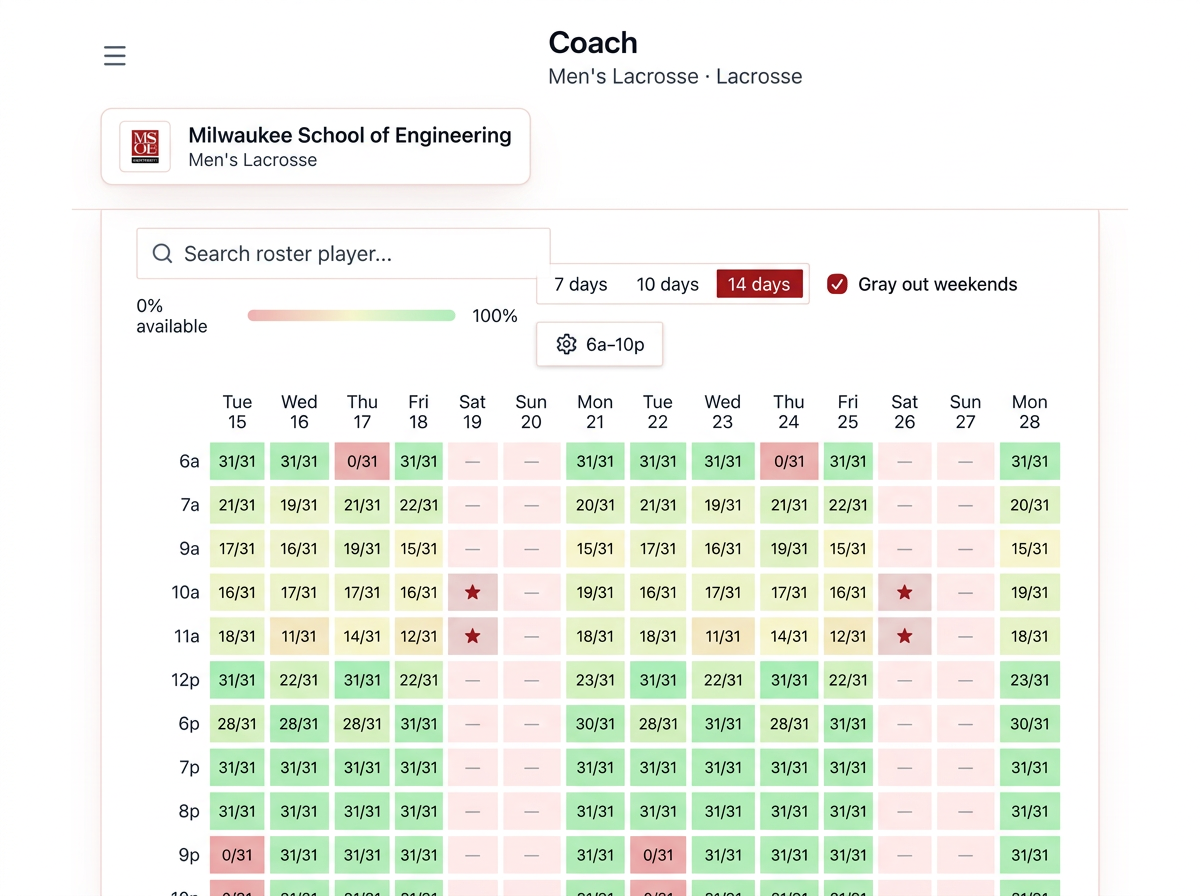
A schedule conflict heatmap for the whole team
Every hour of the week, shaded by how many of your players are sitting in class. Dark blocks are the hours you can't touch. Light blocks are the practice windows nobody has to miss.
- Built from the classes your athletes actually enrolled in.
- Updates itself when a player adds or drops a course.
- Click an hour to see exactly who is unavailable.
- You see class times only — never course titles or grades.
Roster management without the spreadsheet chase
- Upload your roster as a spreadsheet or add players one at a time.
- Invites attach automatically the moment a player creates an account.
- Approve or deny players who ask to join your team.
- Head coaches, assistants and team managers share the same roster.
See the player behind the schedule
- Open any player to see their weekly class load at a glance.
- Color-coded class blocks show exactly where their day is spoken for.
- See which teammates share the same class at the same time.
- Spot the athlete with three labs and a night class before you set lifts.
Build a schedule that reacts
- Practices, games, travel, film and team meetings — single or repeating.
- Conflicts are flagged while you pick the time, not after you send it.
- Change a time once and every player sees the change.
- Players can't edit or delete what you schedule.
One button. It's on every player's calendar.
Publish a practice and it appears instantly in each player's CLIGN calendar alongside their classes and assignments — and in their Google Calendar if they sync it. Move it and it moves for everyone. Cancel it and it disappears. No group text, no "I didn't see it."
Bring CLIGN to your program
Tell us about your team and we'll set you up with a coach account and walk through your roster with you.